Import – Rename – View – Organize – Tag – Print – Document
Integrated solution for image management, layout and printing
PIE Studio combines the powerful metadata and management features of Picture Information Extractor with the advanced printing and layout capabilities of Printstation. The result is a seamless professional workflow for images, covering analysis, organization and final output in a single application.
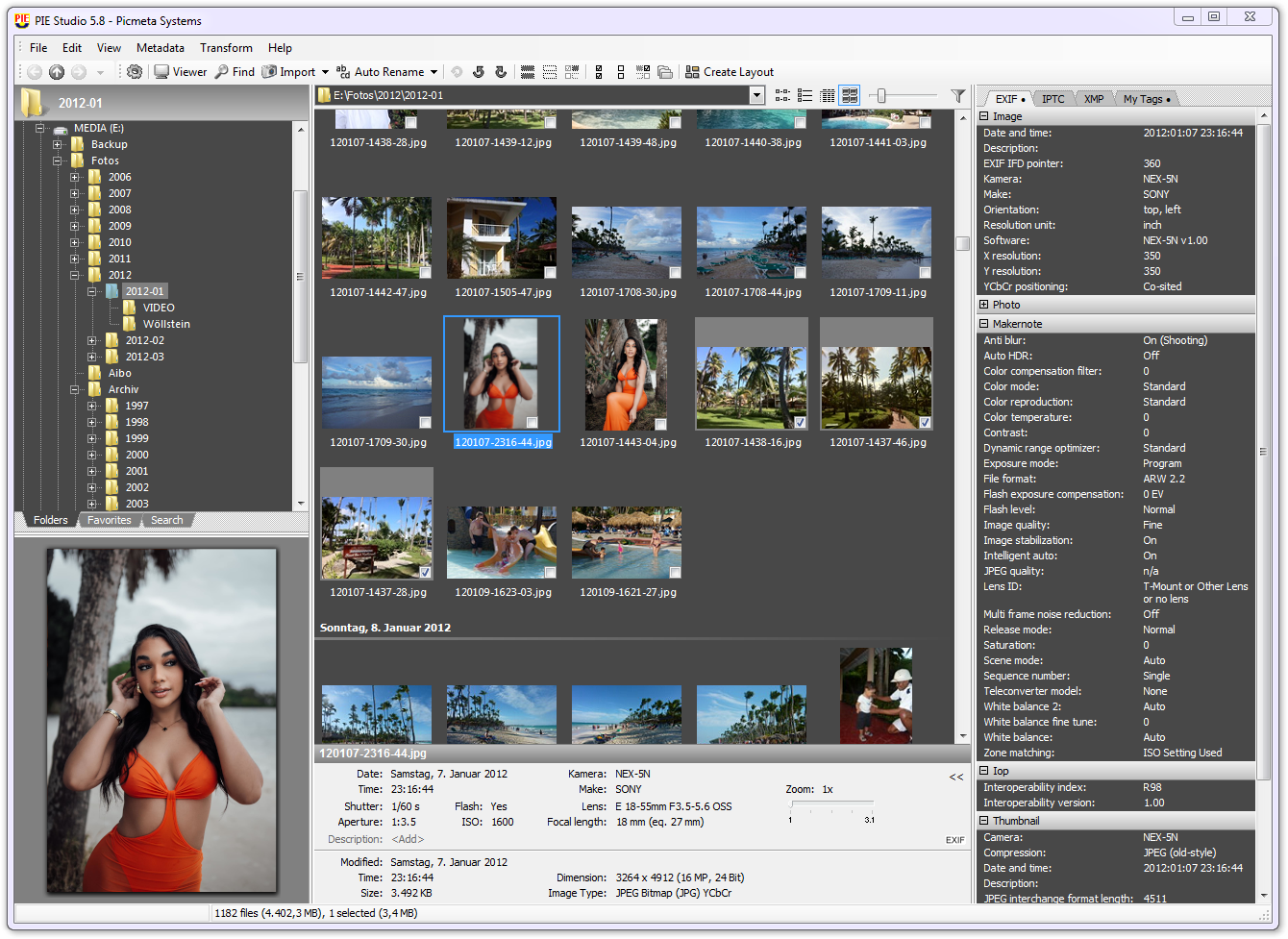
The main window of PIE Studio displays all relevant photographic information together with an image preview. From here you can manage image files, import them from memory cards, automatically rename them, rotate images losslessly and select photos specifically for printing or PDF creation.
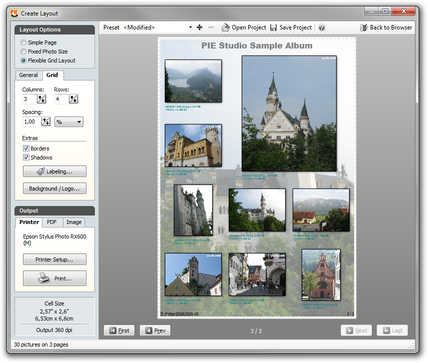
The layout preview is used to define page layouts for printing or PDF generation. Photos can be automatically labeled with metadata. Captions can be placed above, below or directly on the images, using freely configurable font, size and color.
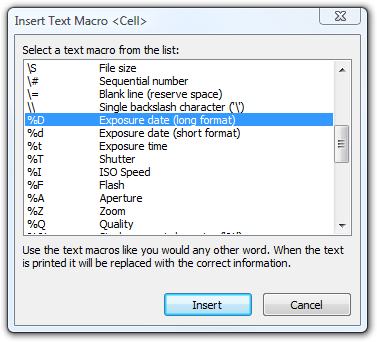 Unlike Printstation, PIE Studio also provides EXIF-based macros such as capture date, camera and lens information, as well as a wide range of IPTC tags. This allows printed pages and PDFs to be automatically annotated with both technical and descriptive image information.
PIE Studio Features
All features of PIE and Printstation combined in a single application:
Metadata
- Extraction and display of EXIF, XMP and IPTC metadata including user-defined metadata (“My Tags”)
- Extensive EXIF and Makernote database supporting virtually all digital cameras
- Interface to ExifTool with optimized multicore processing for maximum performance
- Edit EXIF and IPTC tags in JPG, TIFF and RAW formats in single-file or batch mode
- Metadata templates available directly within the editing dialogs
- Hierarchical keyword lists and categories
- Photo geotagging with interactive map
- Modify or add EXIF date/time in JPG, TIFF and RAW files
- Adjust file timestamps to match capture time
- Remove, back up and restore EXIF, IPTC and XMP metadata
- Export file lists including metadata
Printing & PDF
- Print multiple images per page in rows, columns or standard photo formats
- Enlarge, rotate, move and duplicate individual images
- Automatic size and position adjustment
- Paper saving mode for the maximum number of images per page
- Create PDF albums and index image files
- Full WYSIWYG preview of all pages to be printed
- Flexible caption options with user-defined headings and captions for images and pages
- Captions using file names, capture date, capture time and photographic metadata
- Print photos together with GPS coordinates
- Create contact sheets and albums directly from RAW files
Organization
- File manager with shell integration
- Folder and favorites tree for quick access
- Thumbnail browser with real-time zoom
- Image preview
- Sort by name, capture time, shutter speed, aperture, focal length and more
- Group by date, type, camera, lens, rating, artist and other criteria
- Search files using metadata
- Automatic renaming of image files
- Support for sidecar files (.thm, .xmp, .wav)
- Direct access to batch processing functions from the browser
- Automated memory card import with freely definable folder structures and support for PTP/MTP devices, iPhone and iPad
- One-click deletion of RAW+JPG pairs across different folders
Image Processing
- Lossless JPG rotation
- Lossless cropping of JPG files, including batch mode
- Rotation of RAW files
- Resize images while preserving all metadata
- Photo date stamps
- Comprehensive batch processing support
Image Viewer
- Fast and comfortable image viewer
- Automatic orientation based on the camera’s orientation sensor
- Color management support
- Support for many file formats including DICOM (medical applications) and RAW from almost all digital cameras
Supported RAW Formats
- Sony .ARW .SR2
- Canon .CRW .CR2, .CR3, CHDK
- Adobe Digital Negative .DNG
- Epson .ERF
- Kodak .DCR .KDC
- Mamiya .MEF
- Minolta .MRW
- Nikon .NEF
- Olympus .ORF
- Pentax .PEF
- Panasonic .RW2
- Fuji .RAF
- Leica .RWL
- Generic .RAW
Want to learn more?
- Continuously updated list of changes (English)
To test PIE Studio, please download and install PIE and Printstation separately. The full version of PIE Studio is available by purchasing a license.